
User experience used to be a vague concept. Although there was considerable discussion about how UX influences bounce rates and conversions, no one knew the specific factors that influence it. Additionally, UX encompasses various areas, making objective measurement and assessment difficult.
UX became less cryptic when industry experts started to define it. The ISO (International Organization for Standardization) describes UX as an individual’s response to interacting with a product, service, or system.
Interaction design, information architecture, usability, visual design, and copywriting are just a few of the key disciplines involved in creating a seamless web user experience. They’re all crucial to your website achieving and maintaining high Core Web Vitals. Today, we’ll discuss these metrics and how to optimize your website for Core Web Vitals.
What are Core Web Vitals?
In 2020, Google announced that UX would influence page ranking by May 2021. In addition to existing page experience signals, the search engine also considers loading, responsiveness, and visual stability in its algorithm. These factors are known as Core Web Vitals.
Core Web Vitals provides website owners with three quantifiable UX metrics to enhance web pages and overall performance. Let’s look closer at each of them.
Largest Contentful Paint (LCP)
LCP measures how long it takes for web pages to load their main content. It records the render time of the largest image, text block, or video with the most space on the viewport. This number refers to the time when the user first visited the page.
The faster your pages render content, the better your website’s LCP score. That said, content elements should appear on the screen and be interactive.
What’s a Good LCP Score for Web Pages?
Screenshot from web.dev
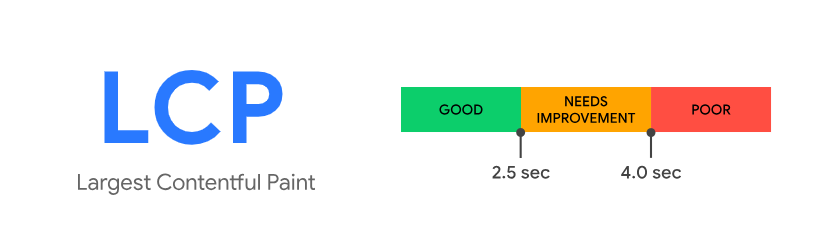
A good LCP score means web pages load within 2.5 seconds. Loading speeds between 2.5 and 4.0 seconds need improvement; anything above 4.0 seconds equates to a poor LCP score.
Slow server response times, excessive JavaScript and CSS (Cascading Style Sheets), and large elements placed above the fold are the usual culprits of poor LCP.
Interaction to Next Paint (INP)
INP replaced First Input Delay (FID), which measures how long it takes for your website to respond to user requests. The metric measures a web page’s responsiveness to user interactions by tracking the latency of user clicks, taps, and keyboard interactions during their time on the page. Your INP score equals the longest interaction observed, excluding outliers.
Google defines an interaction as a group of event handlers that work when a user performs the same logical gesture while browsing a page. When you tap on website elements on a touchscreen device, it triggers events such as pointer up, pointer down, and click. JavaScript, CSS, built-in browser controls, or all of these elements can handle user interactions.
What’s a Good INP Score for Web Pages?
Screenshot from web.dev
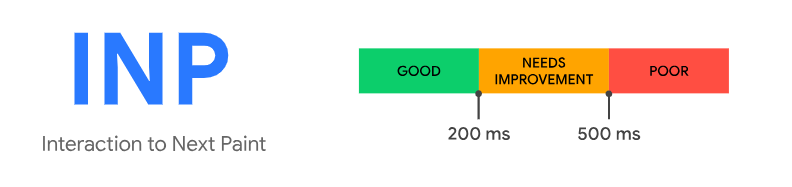
To achieve a good INP score, your page must respond to user interactions within 200 milliseconds or less. INP scores above this number or recorded at 500 milliseconds are equivalent to a Needs Improvement rating.
Meanwhile, an INP above 500 milliseconds indicates poor page responsiveness.
Cumulative Layout Shift (CLS)
CLS is the metric concerned with visual stability. Imagine scrolling through a web page that hasn’t fully rendered its content to understand what it’s about. As more elements appear, one or two usually change position or dynamically resize.
CLS measures the largest burst of layout shift scores for every unexpected movement of page content. A layout shift happens whenever the placement of a visible element shifts from one rendered frame to the next. It’s part of a session window that comprises one or more layout shifts made very quickly. The gap between these changes is set to less than a second. Sometimes, a layout shift can take up to 5 seconds, which counts toward the total window duration.
CLS considers the impact fraction and distance fraction. The former is the area of the viewport that is affected by the movement of unstable elements. On the other hand, the latter is the actual distance traversed by these content blocks. A single layout shift score is the product of these two measures.
What’s a Good CLS Score for Web Pages?
Screenshot from web.dev
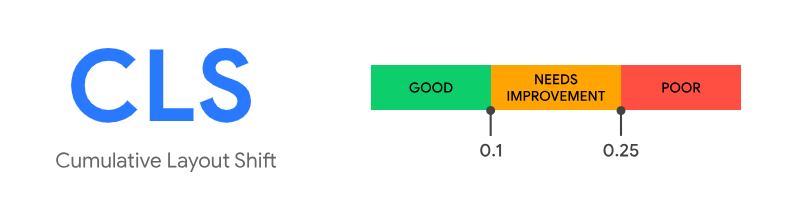
Web pages that score 0.1 or less have good visual stability. Poor CLS (above 0.25) is commonly due to images and videos without specified dimensions, dynamic embeds, and custom web fonts.
9 Tips to Improve Your Core Web Vitals
Here are some helpful tips for enhancing user experience and achieving high Core Web Vitals scores.
Switch to a Dedicated Server
No matter how well you design and build your website, a slow server renders all your efforts worthless. It hinders all loading speed metrics, frustrating visitors and negatively impacting web performance.
Problems usually arise in shared web hosting. Sharing resources with other websites may overload the server, making your website more vulnerable to hacking attacks.
If you suspect a faulty server, consider upgrading to a more reliable hosting plan or exploring alternative providers. (Tip: Use our list of the best web hosting services during your search.) Dedicated servers are preferred because they offer superior performance, enhanced security, and greater flexibility for customizing software and applications.
Optimize Images
Because images are usually placed above the fold, they significantly affect LCP. The best way to optimize them is to reduce their file sizes. To maintain quality, you want to use the right tool and the appropriate image format.
One misconception surrounding image compression is that it decreases image quality or resolution. Zooming in or using the incorrect image format will reveal possible drops or improvements in both. Our advice: choose JPG for landscape images and PNG for graphics. Using next-gen image formats is also a good idea—just remember to research and compare your options first.
After compressing images, rerun an LCP test on your web page. You may have to remove some featured images if you still get a low score.
Alternatively, you can use an image CDN (Content Delivery Network) to reduce the load on your server. It comprises a global server network that stores your content, enabling faster image delivery. By doing so, image CDNs can speed up web page download times by up to 50%.
Remove Non-Critical JavaScript & CSS
JavaScript and CSS make web pages more visually appealing, but they consume a significant amount of bandwidth when used excessively.
Deferring non-critical JavaScript and CSS helps your website load the main content as quickly as possible. You can do so through code splitting, which involves splitting one JavaScript bundle into smaller pieces. This bundle combines multiple files to reduce the number of HTTP requests required for loading web pages.
Additionally, make it a habit to check for junk code and remove it from your script. Web browsers go through every line of code. That means some parts of your website won’t appear unless all scripts are loaded.
Implement Lazy Loading
You can also implement lazy loading to maintain your website’s UX and Core Web Vitals scores. In lazy loading, images load once users scroll down the page. It allows your site to load fast and helps you achieve a high LCP score.
Beyond that, lazy loading can:
- Help your website work better.
- Reduce web page bandwidth.
- Improve your site’s SEO.
- Keep site visitors engaged and reduce the bounce rate.
Now, when should you use this enhancement? While lazy loading can be suitable for pages with multiple images, animations, and videos, it’ll work on any page. If your site has an unsatisfactory LCP score, try implementing lazy loading and comparing the results before and after the rollout.
Split Long Tasks
Long Tasks are lines of JavaScript that keep the main UI thread busy for 50 milliseconds or longer. While hogging the main thread, They cause delayed responses, high or variable input latency, and unresponsive animations. In the worst cases, they can cause the UI to freeze completely.
Optimizing JavaScript execution is the best way to minimize Long Tasks. Ideally, they must be avoided, but splitting code is the next best thing. Broken up into chunks, JavaScript is easier and faster to compile, resulting in faster page load times.
Use a Web Worker
Another solution to managing Long Tasks is to utilize a web worker. JavaScript is often executed in a single thread, creating a long queue of tasks. However, this single-file architecture is prone to blocking.
Web workers bypass this by creating multiple threads to offload other tasks, allowing the browser to handle different requests simultaneously. Even when a long task is in progress, your website remains responsive and ready to respond to clicks, taps, and other commands.
Set the Right Dimensions for Images & Videos
We’ve probably all been to a website where an image or video doesn’t appear proportional to the web page. While the page loads, the embedded media overwhelms the viewport before falling into place. These kinds of websites perform poorly on CLS.
To avoid this, specify the height and width of images and videos before publishing them. This simple tweak fixes them into place as the browser automatically sets the aspect ratio based on the dimensions you’ve given. Alternatively, simply set the width of these elements and let the browser calculate the height automatically.
Another good way to prevent image shift is to save some space for each image uploaded to your website. This can keep your website layout in place if the image loads off-screen.
Reserve Space for Dynamic Content
Generally, dynamic content is so disruptive because there’s no dedicated space for it. Using CSS, you can reserve space so elements appear precisely where you intended.
It is good practice to avoid dynamic content, especially placed above the fold and on top of your main text and images. These pieces of content should only be used if they add value to the user experience, or consider designing them to move only after user interaction.
If your design or marketing strategy needs dynamic content, allocate sufficient space and note the potential white space it will create.
Improve Your Server Response Time
A longer server response time results in a longer rendering time. The quicker the server responds, the better your page-load metrics will be. Moreover, long server response times can hurt your UX.
To determine how quickly your server responds to user requests, use the Time to First Byte (TTFB) metric. It measures when a web browser receives the first byte of your page’s content. Start by gathering and analyzing current server performance data. Then, take these steps to calculate TTFB:
- Check your web hosting speed.
- Use a CDN for your site.
- Re-evaluate your plugins, as each one adds weight to your site. Keep crucial plugins for faster server response times.
Your server should deliver your site’s content in under 600 milliseconds. Any more than that can negatively affect website performance.
Optimize Your Site for Mobile Devices
Google’s mobile-first indexing views mobile sites as their initial or original versions. That’s why you should maintain a responsive site with a smooth UX design on mobile devices.
When designing and optimizing a mobile-friendly site, ensure it features large, clickable buttons that are easy to use. Usability tests can help you determine whether these elements meet both criteria. Also, your mobile site shouldn’t be smaller than its desktop version. Keep your site design consistent across mobile and desktop devices.
Finally, site visitors expect efficient, quick browsing. A clean mobile site design can lead to a simpler user experience and quicker page loading times. Mobile users want important information presented to them quickly, so your mobile site must consistently meet this goal. After all, their phones offer more features if they don’t get what they’re looking for.
Boost Your Conversions with Strategic UX Design
Whether you run an online store or an industry-related website, you must deliver top-notch UX to attract, engage, and convert qualified leads. Core Web Vitals shows you how your website fares in human-system interaction. Track these metrics regularly to identify areas for improvement and implement enhancements that increase engagement and conversions.
Need help improving your website’s UX? Consider hiring DevWerkz’s professional team of web developers and UX designers. Let us utilize our technical expertise and years of experience to deliver the best user experience for your audience. Work with us today.
 View our Solutions